


The WebEdit program has been developed to support the HTML editing without having to by expensive software and it is specially written to facilitate editing needed for FRA purposes. Documents saved in HTML format using, e.g., MS Word can be opened in WebEdit.
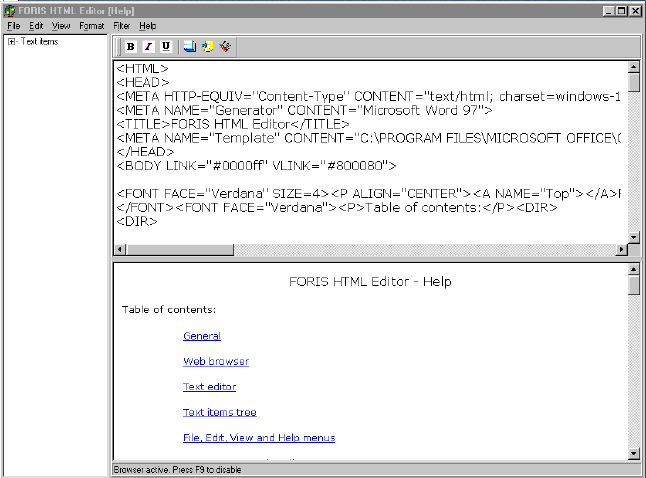
After selecting File and Open command the text layout will appear in lower window and the HTML code in the upper window. Editing of HTML can be done in the upper window and the result is shown instantly in the lower window. The program provides also tools for filtering unnecessary tags from the HTML code. Also spelling mistakes can be corrected by using Replacements command.
On the left side of the program window there is a tree that has special characters that can be added to the text. For example abbreviation of cubic meters is m3 and in HTML there is a need for having superscript tags before the number "3" and as all html tags once a tag is opened it has to be closed also in this case right after the number "3"(<sup>3</sup>). This kind of editing and automatic checks and corrections, replacements and cleanings can easily made by using WebEdit.
Figure 12. WebEdit window
Replasing strings happens with using following char (^). String before this symbol is replaced with string that follows.
The replacement filter of WebEdit can be for example like following list:
Exxample^Example
<P ALIGN="JUSTIFY">^<p>
'^´
à^à
é^é
è^è
ê^ê
ù^ù
É^E
ú^ú
í^í
’^´
ô^ô
ó^ó
á^á
ñ^ñ
<b><p>^<p><b>
<B><P>^<P><B>
-^−
<HTML>^
</HTML>^
<HEAD>^
</HEAD>^
<META HTTP-EQUIV="Content-Type" CONTENT="text/html; charset=windows-1252">^
<META NAME="Generator" CONTENT="Microsoft Word 97">^
<META HTTP−EQUIV="Content−Type" CONTENT="text/html; charset=windows−1252">^
<BODY>^
</BODY>^
<P> </P>^
