Database management and maintenance
Annex A Table structure in the database
Annex B Survey Data Entry Form
Annex C Guidelines on using Survey Data Entry Form
Annex D Guidelines on using Survey Report Form
Annex E Default contents in the Report Definition table
Annex F District and Thana code
This report summarises the outcome of a visit to Bangladesh carried out on behalf of FAO by the NACA Database Management Specialist from 12 to 18 September 1998. The Terms of Reference (TOR) for the mission were:
to assist in setting up a computerised program for handling and analyses of data being collected by the national teams of project TCP/BGD/6714.
The TCP project is supporting the Department of Fisheries in collecting farm level data from around 12,000 shrimp farms in the coastal areas of Bangladesh. The visit aimed to assist the Department of Fisheries in setting up a database for the handling and analysis of these data.
The visit accomplished the following:
setting up of an Access database and data entry form for shrimp farm data;
development of guidelines for data entry and management;
training of Department of Fisheries staff in data entry and database management; and
design of a report form for data analysis and presentation of results.
The details of itinerary, persons met and major activities undertaken are appended as Annex G. The following gives a more detailed description of the database and other issues.
There are two major objectives for setting up this database.
1. Computerisation of data collected in the questionnaire.
2. Analysis of the questionnaire from computerised data.
1. MS Access comes with the MS office package. The package is available on most PCs with the Windows operating system. Setting up a database with this management system does not need extra hardware and software. Data entry can be operated everywhere on any PC. The system is also available in the Department of Fisheries.
2. It is efficient for MS Access to process such project scale databases. With powerful built-in functions, it is easy to meet the objectives of data analysis and reporting.
Two kinds of forms were developed using MS Access; a data entry form and a data report form.
For the data entry and report form, tables were designed. The following tables are needed for this project:
Survey
Education dictionary
Location dictionary
Union dictionary
Report definition; and
Report menu
The Survey table is the main database file, and all data from the questionnaire are stored in this table file. Others are auxiliary tables. The structures of the tables are listed in Annex A. To ensure that data are entered correctly, each field in the table file has been set with a valid rule. However, the rules are not very strict for some fields due to missing data in the questionnaire. The Report definition table is an output template table. It is easy to customise. Table D-1 in Annex D gives the values and description about this table.
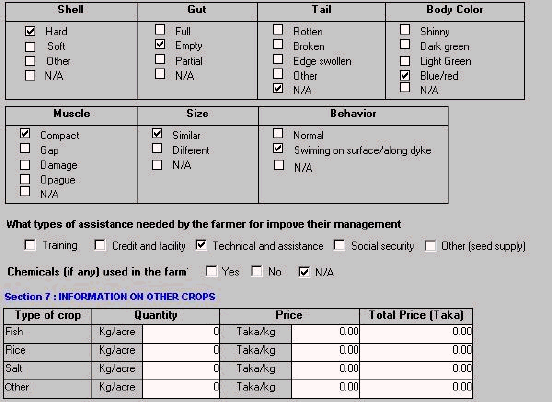
The data entry form has several functions: data entry, editing, modifying data, deleting and printing. The data entry form as designed for the project is given in Annex B.
All the default data manipulation functions are available in Access. There are 11 command buttons in the data entry form. The functions of those commands are given in Annex C. The appearance of the data entry form is similar to the questionnaire. This enables the operator to match data easily. Where possible, data entry has been simplified to reduce the amount of typing and errors. For some uncertain fields, such as "Union", dynamic updated pull down menu is used to minimise problems caused by typing errors.
The report form has been designed to provide a summary of the main findings from the survey. The data can be extracted as files or printed as hard copies. The hard copy can be used as a project report directly. The reporting file can be used by other applications such as MS WORD, MS EXCEL for re-formatting or by statistical packages such as SPSS for further analysis.
With the report form, selecting any one of the fields from a table survey can generate the reporting file. The reporting file is in MS Office Excel 97 format. It may contain one sheet or many sheets with different columns. Sheet name and column value come from survey table. The contents in each sheet depend on the Report definition table, and data of table survey Annex E gives the default report file contents. For example: both sheet name and column name can be a Location (Thana), Union, education level, ownership, water area, type of culture, fry source and stocking size and so on. The survey report form allows flexibility to obtain various reports. For more details, see Annex D for guidelines on using the survey report form.
The following steps were completed during the visit:
1. Identification of the type, unit and size of field in the table file. The design of the table and data entry form were based on the questionnaire. However the type, unit and size of field are not defined in questionnaire. So this step is a key to design a sound table structure.
2. Verification of the table structure and field validation with assistance from the District Fisheries Officers.
3. Design of data entry form and report forms.
4. Revision of table and form. The questionnaire has been changed during data collection. In order to record data correctly, the table structure and data entry form have been changed to be consistent with the questionnaire.
5. Data entry test and finalization of the data entry form. 47 samples were tested using questionnaires from Teknaf Thana.
The following steps need to be carried out once the data has been entered.
6. Debug and test the report form. Only after data has been entered, can the report form be tested and debugged.
7. Finalising and printing of the report form.
Backing up the database is quite easy but it is a very important task. The simple way is to copy the database file to another removable media such as a floppy diskette or external hard disk or zip disk or RW CD ROM. Using floppy diskette as backup media is an economic way, but it is necessary to split the file when the size of the database file is more than the capacity of the floppy diskette. In order to save the number of backup floppy diskette, it is recommended to compress the database file before splitting the backup file, using the procedure below.
1. Open Database file by using MS Access
2. Choose menu Tools\Database utilities\compact database
3. Install Winzip program ( skip this step if installed already)
4. Add database to zip file by using Winzip program.
1. Install split program (skip this step if installed already)
2. Highlight database file by left mouse and click
3. Choose split the file by clicking mouse right button
4. Select options by following the prompt
5. Click start
If data entry is operated on different machines, it is necessary to merge the database file before doing any processing. The following steps can be used to do this:
1. Open database file by using MS Access
2. Copy current Survey table to temp
3. Import survey table from another database file into current database file, and name it as survey1
4. Create one query (such as Merge Survey Table), which can append survey1 to temp (skip this step if append query already exists)
5. Run append query (such as Merge Survey Table)
6. Delete table Survey1
7. Repeat from step 3 if more database files need merging
8. Delete table survey
9. Rename temp as survey
The visit developed the data entry form and a report form. These are now with the Department of Fisheries for data entry and reporting. There are a number of issues for consideration to follow up from the visit:
There are about 12,000 records to be entered in the database. Each record needs about 1024 bytes uncompressed and 624 bytes compressed disk space and 3-5 minutes for data entry. There are about 50 queries stored in the database. Running query needs certain memory on the computer for better performance.
1. Pentium 133 or higher
2. 200 MB free hard disk space or more; better to install second hard disk for backup
3. 32 MB RAM or more
There is only one computer available for data entry in the Department of Fisheries, which has only 16MB RAM and without CD-ROM. If funds are available, this computer should be updated to 32MB with CD-ROM. It would be more convenient to install an application program such as MS Office and for data entry operations. The number of computers for data entry should be more than one.
1. A substantial amount of time is required for data entry. Estimated data entry days for 12,000 questionnaires is about 170 days based on one computer, 6 hours per day, 3-5 minutes per questionnaire. As there is limited time, the data entry will have to be carried out by several operators. This process will require careful monitoring by the district fisheries officer who will train/monitor the data entry.
2. The questionnaire must be checked and coded before data entry. Instructions on how to code the questionnaire and enter data are given in Annex C.
3. The data entry operator must be familiar with the questionnaire, particular relevant to the unit of each field. The people trained in the DOF must provide training to the data entry persons.
The data generated through the survey and analysis will be very important in determining the present situation with shrimp disease in Bangladesh and future directions for assistance to farmers and shrimp disease control strategies. The database and analysis of the data will be an important baseline for the Department of Fisheries and should be analysed fully. The benefit to Bangladesh of the database can be further extended as follows:
NACA and FAO are working on development of a model for assessing economic impacts of shrimp and fish diseases and cost-benefits of disease control methods. Close cooperation between the Department of Fisheries, NACA and FAO on this initiative would be beneficial to all parties.
The information would also be useful as a starting point for a shrimp disease surveillance system for the shrimp farming areas in Bangladesh. The setting up of such a system is part of the national activities to be undertaken under the ongoing regional FAO/NACA TCP project "Assistance for Responsible Movement of Live Aquatic Animals" TCP/RAS/6714.
A visit was also paid to the Bangladesh Fisheries Research Institute (BFRI) at Mymensingh to assist the Fish Disease Laboratory in setting up a data entry database for the AAPQIS (Aquatic Animal Pathogen and Quarantine Information System) database which is being installed in participating countries as part of the above mentioned regional TCP project. An Access data entry system was provided for entering data into the AAPQIS in the fish disease laboratory and training given in data entry. Hopefully, this assistance will enable the Fish Disease Laboratory to collate fish disease references as required for AAPQIS.
Discussions were also held with the Director-General, BFRI, who had requested assistance in linking the disease laboratory to the Internet. This linkage will be essential in providing the disease laboratory with access to AAPQIS, which is currently available via Internet. BFRI would cover the cost of establishing the modem and internet.
Name Type Size
Description Text 30
Relationships
Education DictionarySurvey
Education Dictionary Survey
Description 1 - Educationlevel
Attributes: Enforced, Cascade Updates, Right Join
OrderByOn: One-To-Many
Name Type Size
Description Text 30
Relationships
Location DictionarySurvey
Location Dictionary Survey
Description 1 - Location
Attributes: Enforced, Cascade Updates, Right Join
OrderByOn: One-To-Many
Name Type Size
Code Text 9
Location Text 30
Union Text 50
Date Date/Time 8
Farmername Text 50
Address Memo -
Educationlevel Text 30
ExperienceYear Number (Integer) 2
Ownership Number (Byte) 1
TotalArea Number (Double) 8
PondNo Number (Integer) 2
WaterArea Number (Double) 8
GateNo Number (Integer) 2
InletSize Number (Integer) 2
OutletSize Number (Integer) 2
CultureType Number (Byte) 1
FrySource Number (Byte) 1
PLAge Number (Integer) 2
Acclimation Number (Byte) 1
N-No Number (Integer) 2
N-Area Number (Double) 8
N-LimeRate1 Number (Double) 8
N-LimeRate2 Number (Double) 8
N-LimeRate3 Number (Double) 8
N-FertRate1 Number (Double) 8
N-FertRate2 Number (Double) 8
N-FertRate3 Number (Double) 8
N-FeedRate1 Number (Long) 4
N-FeedRate2 Number (Long) 4
bagdadensity Number (Long) 4
otherdensity Number (Long) 4
SurvivalRate Number (Integer) 2
G-dry Yes/No 1
G-Scrape Yes/No 1
G-Plough Yes/No 1
G-LimeRate1 Number (Double) 8
G-LimeRate2 Number (Double) 8
G-LimeRate3 Number (Double) 8
G-FertRate1 Number (Double) 8
G-FertRate2 Number (Double) 8
G-FertRate3 Number (Double) 8
G-FeedRate1 Number (Long) 4
G-FeedRate2 Number (Long) 4
FeedMethod Number (Byte) 1
WaterIntake Number (Byte) 1
WaterExchange Number (Byte) 1
N-WaterColor Number (Byte) 1
G-WaterColor Number (Byte) 1
N-SalinityMin Number (Single) 4
N-PHMin Number (Single) 4
N-AlkalinityMin Number (Single) 4
N-AmmoniaMin Number (Single) 4
N-SalinityMax Number (Single) 4
N-PHMax Number (Single) 4
N-AlkalinityMax Number (Single) 4
N-AmmoniaMax Number (Single) 4
N-WaterDepth Number (Byte) 1
G-SalinityMin Number (Single) 4
G-PHMin Number (Single) 4
G-AlkalinityMin Number (Single) 4
G-AmmoniaMin Number (Single) 4
G-SalinityMax Number (Single) 4
G-PHMax Number (Single) 4
G-AlkalinityMax Number (Single) 4
G-AmmoniaMax Number (Single) 4
G-WaterDepth Number (Byte) 1
BagdaWeight Number (Double) 8
BagdaPrice Number (Single) 4
OtherWeight Number (Double) 8
OtherPrice Number (Single) 4
FishWeight Number (Double) 8
FishPrice Number (Single) 4
PLNumber Number (Double) 8
PLPrice Number (Single) 4
PLPaid Number (Double) 8
LimeNumber Number (Double) 8
LimePrice Number (Single) 4
LimePaid Number (Double) 8
FerttlizerNumber Number (Double) 8
FerttlizerPrice Number (Single) 4
FertilizerPaid Number (Double) 8
FeedNumber Number (Double) 8
FeedPrice Number (Single) 4
FeedPaid Number (Double) 8
FuelNumber Number (Double) 8
FuelPrice Number (Single) 4
FuelPaid Number (Double) 8
LaborNumber Number (Integer) 2
LaborPrice Number (Single) 4
LaborPaid Number (Double) 8
LeaseNumber Number (Single) 4
LeasePrice Number (Single) 4
LeasePaid Number (Double) 8
PondPaid Number (Double) 8
Other1 Text 50
Other1Paid Number (Double) 8
ShrimpNo Number (Long) 4
Fouling Number (Byte) 1
GillColor Number (Byte) 1
GillAppearance Number (Byte) 1
Damage Number (Byte) 1
S-Shell Number (Byte) 1
S-Gut Number (Byte) 1
S-Tail Number (Byte) 1
S-BodyColor Number (Long) 4
S-Muscle Number (Byte) 1
S-Size Number (Long) 4
S-Behavior Number (Byte) 1
AssitType1 Yes/No 1
AssitType2 Yes/No 1
AssitType3 Yes/No 1
AssitType4 Yes/No 1
AssitType5 Yes/No 1
Chemical Number (Byte) 1
TypeofCrop Number (Byte) 1
CropFishWeight Number (Long) 4
CropFishPrice Number (Long) 4
CropFishTotal Number (Long) 4
CropRiceWeight Number (Long) 4
CropRicePrice Number (Long) 4
CropRiceTotal Number (Long) 4
CropSaltWeight Number (Long) 4
CropSaltPrice Number (Long) 4
CropSaltTotal Number (Long) 4
CropOtherWeight Number (Long) 4
CropOtherPrice Number (Long) 4
CropOtherTotal Number (Long) 4
Relationships
Education DictionarySurvey
Education Dictionary Survey
Description 1 - Educationlevel
Attributes: Enforced, Cascade Updates, Right Join
OrderByOn: One-To-Many
Location DictionarySurvey
Location Dictionary Survey
Description 1 - Location
Attributes: Enforced, Cascade Updates, Right Join
Attributes: One-To-Many
Name Type Size
Description Text 30
Name Type Size
LineNo Number (Long) 4
item Text 127
Unit Text 20
Name Text 255
Type Text 1
ID Text 1
Method Number (Byte) 1
ProcName Text 50
where Text 255
Name Type Size
menuitem Text 255
Value Number (Integer) 2
Description Text 255
Name Text 50
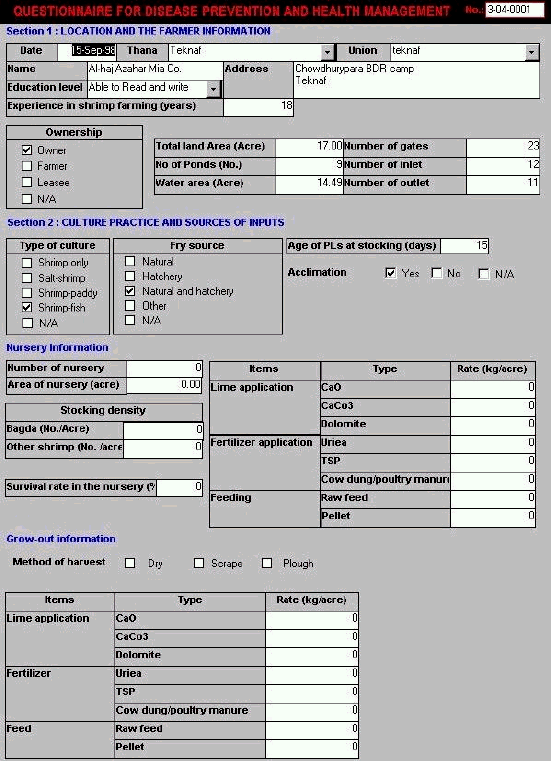

The database file Shrimp.mdb is developed in MS Access 97 to manage and analyse survey data being collected by national teams of the project. The original questionnaire is attached as Annex H.
The database file Shrimp.mdb needs Microsoft Access 97 or higher to operate. Microsoft Access 97 comes with MS office 97. Install this program if it is not available in your system.
1. Create one working subdirectory.
For example c:\shrimp
2. Copy database file shrimp.mdb from the enclosed floppy disk to the working subdirectory.
There are two ways to start:
1. Click Start/Programs/Microsoft Access
2. Then choose File/Open Database
3. Select file shrimp.mdb
Or
From Windows Explorer, double click on file name shrimp.mdb
The data entry form questionnaire for disease prevention and health management will be displayed.
Each questionnaire can be entered within one data entry form, and each data entry form corresponds to one questionnaire. Each edit box (field) in the entry form corresponds to the item of questionnaire. So record operation and field operation can do the whole data entry operation.
After shrimp.mdb is opened, there is a command bar located at the bottom of the data entry form. When the mouse moves on each icon, the help tip text will be displayed. You may click on one of these icons to perform your record operation.
 Adds new record.
 Saves current record.
 Deletes current record.
 Aborts current record operation.
 Duplicates current record and append it
at end of database.
Duplicates current record and append it
at end of database.
 Sends current record to printer.
 Moves current edit or view record to
first record.
Moves current edit or view record to
first record.
 Moves current edit or view to previous
record.
Moves current edit or view to previous
record.
 Moves current edit or view record to
next record or adds a new record if current record is already last.
Moves current edit or view record to
next record or adds a new record if current record is already last.
 Moves current edit or view record to
last record.
Moves current edit or view record to
last record.
 Closes database file and exits.
For finding a specified record, for example, to find the record with Code number 1-04-0001, you can move your cursor to code edit box, then choose menu Edit, Find, type code number 1-04-0001 in the Find what box, then choose Find first or Find next.
The data entry form will automatically validate each record and check the edit box. If you cannot move from the record you are currently working onto another record, this means that the current record is not completed, and there may be some data entry conflict with its valid rule. To exit an uncompleted record, you must click on the undo button at the bottom to abort the current record editing. At this time, if you click save button, instructions on the screen will show you where you must enter it.
1. When you add a new record, the cursor will be set to first edit box, enter data in the edit box according to corresponding caption.
2. Move to the next editing box by using Return, TAB or Down cursor key.
3. Move previous editing box by using CTRL+TAB or Up cursor key.
4. Move to what you desire by using mouse.
1. Code Number is composed of three parts with a total of seven numerical characters. They indicate District, Thana and Questionnaire series number respectively. Each part is separated by hyphen "-", for example, 1-01-0001, where 1, 01 and 0001 stand for Bagerhat district, Mongla Thana and number 1 questionnaire. There are a total of 5 districts and 19 Thanas. The code is given in Annex F.
2. Date is entered in questionnaire interview date. The example format of date is 28/Jan/98.
3. Thana is entered by select items in the pull down menu. There are 19 predefined Thanaes in the menu. See Annex F. Those items are stored in the table file Location Dictionary. You must consult your database supervisor if you want to change it. The database supervisor will probably be a district fisheries officer.
4. Union is an uncertain item. This is defined at the data entry time. As soon as it is entered you can use pull down menu to select it. To add new union by choosing "Yes" after your new union has be entered. To remove union, double click at union editing box.
5. Name is entered in full, with a maximum length of 50 characters.
6. Address can be entered with unlimited lengths. You can use CTRL+ENTER key for the new line in the editing box.
7. Experience - years in shrimp farm is a rounded integer numerical value.
8. Ownership has two options, Owner and Lease. If farmer is used in questionnaire, choose Owner. Where N/A appears, this means Not Available in questionnaire. This applies to all options menu in the data entry form.
9. The unit of total land area and total water area is acre.
10. No. of pond should be grow out ponds.
Is this just grow-out ponds or include nursery ponds
Do not skip it.
11. Unit of inlet and outlet is number, not area.
12. Type of culture has four options: Shrimp only, salt-shrimp, shrimp-paddy, and shrimp-fish.
13. Fry source has 4 options: Natural, hatchery, natural and hatchery and other.
14. The unit of Age of PLs at stocking is days. If it is given by range in the questionnaire, entered in mid value. For example, 10-15 days entered in 13.
15. Acclimation is yes if with any temperature, salinity, and any other factor procedure. Otherwise select no.
16. Number of nursery
17. The unit of area of nursery is acre
18. The application rate of lime, fertiliser and feed is kg/acre/year/times
19. The stocking density of Bagda and other shrimp is No/acre.
20. Survival rate in the nursery is in percentage.
21. Method of harvest can be any combination of dry, scrape and plough.
22. Type of assistance can be any combination of training, credit and facility, technical and assistance, social security and other.
23. The unit of quantity of other crop is kg/acre/year
The Survey Report Form is a component of the database developed for the TCP project. The form lets you generate a database / survey report based on the following features:
1. Report definition table. This table is easy to customize. There is one table file called Report Definition in database, which is provided as a basic report definition template.
2. Report can be generated as one sheet or a set of sheets, by selecting any one or a pair of fields from the database. The selected field is defined in the Report Menu table.
3. MS office 97 Excel file format is used as report output file format.
1. Using Windows explorer to create one working directory such as C:\BGD6714
2. Copy database file Survey2.mdb which contains Survey Report Form to your working directory C:\BGD6714.
Skips this step if the database has been updated.
1. Using MS Access to open database file C:\BGD6714\Survey2.mdb
2. Delete table Survey from Survey2.mdb database by selecting tab tables, then choose Survey, click Cut icon or select menu Edit \ Cut.
3. Import table Survey from Shrimp.mdb by selecting File \ Get External Data \ Import, then choose file Shrimp.mdb, click Import button. Then select Tables \ Survey, click button OK.
1. After you open database file Survey2.mdb, click Tab Forms, choosing Survey Report Form, then click Open. The following window will be displayed:
2. Select sheet set name or column set name or both by choosing item from pull down menu and type output directory, then click Start

1. The report file is located under the Output directory that you specify when generating output report file.
2. The report file name will be sssbyccc.xls, where sss is sheet name and ccc is column name if sss is different from ccc. If only one of them is specified or both names are the same, the file name becomes xxx.xls, where xxx is either sheet name or column name.
3.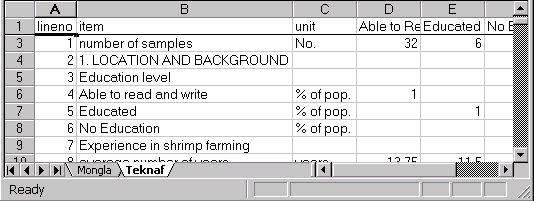
4. The report file format is in MS Office 97 EXCEL format, so you have to use Excel to open and print it. For example, if you select Thana as sheet name and Education level as column name, the report file name should be [thana by Education level.xls] and excel sheet is as below.
Since the Survey Report Form generates an output report file base on Report Definition table, it is very convenient to change the report context by customizing the Report Definition table. The following information is provided for this purpose.
Table D-1. The values and description in Report Definition table
| Field Name | Description | Values |
| LineNo | Used for output ordering | Any integer |
| Item | Report sheet item description | Any character string |
| Unit | Report sheet unit description | Any character string |
| Name | Field name in Survey table or Access expression if field ID is specified by "S" | Field name in string or any access expression |
| Type | Indicate the field Name type or calculating result data type if field ID is specified by "S" | N = numerical C = character L = logical |
| ID | Indicates calculating method | A = average P = percentage C = count S = special |
| Method | Indicates calculating method option | 0 = normal 1 = positive 2 = weighted |
| ProcName | Specify procedure name | Procedure name string |
| Where | Specify query criteria | Access query criteria expression |
Table D-2. The difference in database file between Shrimp.mdb and Survey2.mdb
| Name | Type | Shrimp.mdb | Survey2.mdb |
| Education Dictionary | Table | v | v |
| Location Dictionary | Table | v | v |
| Report Definition | Table | v | |
| Report Menu | Table | v | |
| Survey | Table | v | v |
| Union Dictionary | Table | v | v |
| Survey Data Entry Form | Form | v | v |
| Survey Report Form | Form | v | |
| Autoexec | Macro | v | |
| Utility | Module | v |
When you generate output file, if the output file has existed in the output directory, the output file will be updated. But if the output file is opened in MS Office EXCEL 97 at the same time, the program does not output the generating file. So if you have updated the output file which already exists in the output directory, then the file has to be closed.
When you generate an output file, and if you would like to generate only one sheet with a different column value, the three selection cases will generate the same output file for this.
a) when sheet set has been selected, but column set leaves blank;
b) when sheet set is left blank, but column set has been selected;
c) both sheet set and column set have been selected with same item.
For example, if you want to generate one sheet with each column containing different Thanas, then one of following selections will generate the same output file such as thana.xls.
a) select Thana in the sheet set box and leave column set box blank;
b) select Thana in the column set box and leave column set box blank;
c) both sheet set box and column set box select Thana.
After generating output file, your database can become fragmented and the disk space usage inefficient. Compacting the database makes a copy of the database, rearranging how the database file is stored on disk.
To compact the current database
1. On the Tools menu, point to Database Utilities, and then click Compact Database.
To compact a database that isn't open in Microsoft Access
1. Close the current database.
2. On the Tools menu, point to Database Utilities, and then click Compact Database.
3. In the Database To Compact From dialog box, specify the database you want to compact, and click Compact.
4. In the Compact Database Into dialog box, specify a name, drive, and folder for the compacted database.
5. Click Save.
| Items | Unit | ||||
| 1. LOCATION AND BACKGROUND | |||||
| Education level | |||||
| Able to read and write | % | ||||
| Educated | % | ||||
| No Education | % | ||||
| Experience in shrimp farming | |||||
| Average number of years | Years | ||||
| Ownership | |||||
| Owner or Farmer | % | ||||
| Lease | % | ||||
| Land use | |||||
| Average land area | Acre | ||||
| No of ponds | No. | ||||
| Water area | Acre | ||||
| Water area as % total land area | % | ||||
| Number of gates | No. | ||||
| Number of inlet | No. | ||||
| Number of outlet | No. | ||||
| 2. CULTURE PRACTICES | |||||
| Type of culture | |||||
| Shrimp only | % | ||||
| Salt-shrimp | % | ||||
| Shrimp-Paddy | % | ||||
| Shrimp-fish | % | ||||
| Fry source | |||||
| Natural | % | ||||
| Average age at stocking | days | ||||
| Hatchery | % | ||||
| Average age at stocking | days | ||||
| Natural and hatchery | % | ||||
| Average age at stocking | days | ||||
| Acclimatization | |||||
| Acclimatization | % | ||||
| Nursery information | |||||
| Farms with nurseries | % | ||||
| No. of nurseries | no. | ||||
| Area of Nursery | Acre | ||||
| Lime application | |||||
| CaO | % | ||||
| kg/acre | |||||
| CaCo3 | % | ||||
| kg/acre | |||||
| Dolomite | % | ||||
| kg/acre | |||||
| Fertilizer application | |||||
| Urea | % | ||||
| kg/acre | |||||
| TSP | % | ||||
| kg/acre | |||||
| Cow dung/poultry manure | % | ||||
| kg/acre | |||||
| Feeding | |||||
| Raw feed | % | ||||
| kg/acre | |||||
| Pellet | % | ||||
| kg/acre | |||||
| Stocking density | |||||
| Bagda (P.monodon) | PL/m2 | ||||
| Other shrimp | PL/m2 | ||||
| Survival rate in the nursery | % | ||||
| Grow-out information | |||||
| Pond preparation | |||||
| Drying | % | ||||
| Scrape | % | ||||
| Plough | % | ||||
| dry & scrape | % | ||||
| dry & plough | % | ||||
| Scrape & plough | % | ||||
| dry, scrape & plough | % | ||||
| Lime application | |||||
| CaO | % | ||||
| kg/acre | |||||
| CaCo3 | % | ||||
| kg/acre | |||||
| Dolomite | % | ||||
| kg/acre | |||||
| Fertilizer | |||||
| Urea | % | ||||
| kg/acre | |||||
| TSP | % | ||||
| kg/acre | |||||
| Cow dung/poultry manure | % | ||||
| kg/acre | |||||
| Feeding | |||||
| Raw feed | % | ||||
| kg/acre | |||||
| Pellet | % | ||||
| kg/acre | |||||
| Feed and water management | |||||
| Methods of feeding | |||||
| Trays | % | ||||
| Manually | % | ||||
| Both | % | ||||
| Water intake | |||||
| Tidal | % | ||||
| Pumps | % | ||||
| Both | % | ||||
| Water exchange | |||||
| New/full moon day | % | ||||
| Weekly | % | ||||
| Irregularly | % | ||||
| No change | % | ||||
| 3. WATER QUALITY | |||||
| In the nursery | |||||
| Transparent | % | ||||
| Green | % | ||||
| Dark green | % | ||||
| Brown | % | ||||
| Brownish-green | % | ||||
| Salinity | ppt | ||||
| PH | |||||
| Alkalinity | ppm | ||||
| Ammonia | ppm | ||||
| Depth of water | |||||
| < 1ft | % | ||||
| 1-2 ft | % | ||||
| 2-3 ft | % | ||||
| >3 ft | % | ||||
| Grow-out | |||||
| Transparent | % | ||||
| Green | % | ||||
| Dark green | % | ||||
| Brown | % | ||||
| Brownish-green | % | ||||
| Salinity | ppt | ||||
| PH | |||||
| Alkalinity | ppm | ||||
| Ammonia | ppm | ||||
| Depth of water | |||||
| < 1ft | % | ||||
| 1-2 ft | % | ||||
| 2-3 ft | % | ||||
| >3 ft | % | ||||
| 4. ANNUAL PRODUCTION INFORMATION | |||||
| Bagda (P.monodon) | kg/acre | ||||
| Tk/kg | |||||
| Other shrimp | kg/acre | ||||
| Tk/kg | |||||
| Fish | kg/acre | ||||
| Tk/kg | |||||
| Total shrimp production | kg | ||||
| Total fish production | kg | ||||
| Total value of production | Tk | ||||
| 5. PRODUCTION COST | |||||
| PLs | Tk | ||||
| Lime | Tk | ||||
| Fertiliser | Tk | ||||
| Feed | Tk | ||||
| Fuel | Tk | ||||
| Labour | Tk | ||||
| Lease/rent | Tk | ||||
| Pond maintenance | Tk | ||||
| Others | Tk | ||||
| Total production cost | Tk | ||||
| 6. INFORMATION ON SHRIMP HEALTH | |||||
| Average no. shrimp examined | No. | ||||
| External fouling | |||||
| None | % | ||||
| Light | % | ||||
| Heavy | % | ||||
| Gill color | |||||
| Normal | % | ||||
| Black | % | ||||
| Red | % | ||||
| Gill appearance | |||||
| Dirty | % | ||||
| Damage | % | ||||
| Appendages | |||||
| Normal | % | ||||
| Damage | % | ||||
| Broken | % | ||||
| Shell | |||||
| Hard | % | ||||
| Soft | % | ||||
| Other | % | ||||
| Gut | |||||
| Full | % | ||||
| Empty | % | ||||
| Partial | % | ||||
| Tail | |||||
| Rotten | % | ||||
| Broken | % | ||||
| Edge swollen | % | ||||
| Other | % | ||||
| Body color | |||||
| Shinny | % | ||||
| Dark green | % | ||||
| Light green | % | ||||
| Blue/red | % | ||||
| Muscle | |||||
| Compact | % | ||||
| Gap | % | ||||
| Damage | % | ||||
| Opaque | % | ||||
| Size | |||||
| Similar | % | ||||
| Different | % | ||||
| Behavior | |||||
| Normal | % | ||||
| Swimming on surface/along dyke | % | ||||
| Types of assistance | |||||
| Training | % | ||||
| Credit and facility | % | ||||
| Technical and assistance | % | ||||
| Social security | % | ||||
| Other | % | ||||
| Chemicals used | |||||
| Chemicals used | % | ||||
| 7. INFORMATION ON OTHER CROPS | |||||
| Fish | kg/acre | ||||
| Tk/kg | |||||
| Rice | kg/acre | ||||
| Tk/kg | |||||
| Salt | kg/acre | ||||
| Tk/kg | |||||
| Other | kg/acre | ||||
| Tk/kg | |||||
| Total other crops value | Tk |
Table F-1 District and Thana Codes
| Code | District | Thana |
| 1-01 | Bagerhat | Mongla |
| 1-02 | Rampal | |
| 1-03 | Sadar | |
| 2-01 | Chittagong | Banskhali |
| 3-01 | Cox's Bazar | Chakoria |
| 3-02 | Moiskhali | |
| 3-03 | Sadar | |
| 3-04 | Teknaf | |
| 3-05 | Ukhia | |
| 4-01 | Khulna | Batiaghata |
| 4-02 | Dacope | |
| 4-03 | Dumuria | |
| 4-04 | Paikgacha | |
| 5-01 | Satkhira | Assasuni |
| 5-02 | Debhata | |
| 5-03 | Kaligong | |
| 5-04 | Sadar | |
| 5-05 | Shymnagar | |
| 5-06 | Tala |
| Date | Organization, Personnel met | Activities |
| 12/09/98 | Dr. Hiroyuki Konuma (FAO, Representative) Dr. Wajed A. Shah (FAO, Program officer) |
1. Depart for Dhaka, 2. Meeting with FAO Representative Dr. H. Konuma and program officer Dr. W. A. Shah 3. Introduction to necessity of project data computerization. 4. Introduction to status of project data collection. 5. Draft and review project questionnaire. 6. Make intensive program for this visit. |
| 13/09/98 | Dr. Wajed A. Shah (FAO, Program officer) Dr. Raman (Director, Dept. of Fisheries, DOF) Mr. Rezaul Karim (District Fisheries officer, Khulaa, DOF) Dr. Nitya Nanda Das (District Fisheries officer, Cox's Bazar, DOF) Mr. Swapan Chadra Paul (District Fisheries officer, Dhaka, DOF) |
7. Meeting with Director Dr. Raman. 8. Review collected questionnaire. 9. Making consistent unit for database design base on current collected questionnaire. 10. Discuss on reporting file from database (tabulation and analysis) for the project. |
| 14/09/98 | District fisheries officers (DOF) | 11. Design table and data entry form. |
| 15/09/98 | District fisheries officers (DOF) | 12. Continue to design table and data entry form. 13. Introduction to basic procedure of data entry and management including backup, splitting and merge and exchange. 14. Demonstration on data entry operation. 15. Revise database file consistent with practical questionnaire. |
| 16/09/98 | Dr. M. A. Mazid (Director General , BFRI) Dr. M. G. Hussain (Freshwater station , BFRI) Ms. Hasna Banu (Disease section , BFRI) |
16. Start data entry (Department of Fisheries). 17. Meeting with Director of BFRI. 18. Install data entry form for AAPQIS and demonstration on data entry. 19. Discuss on data exchange issues. |
| 17/09/98 | District fisheries officers (DOF) Dr. Hiroyuki Konuma |
20. Continue data entry. 21. Discuss on the detail of database reporting file and how to use it to do further statistics analysis by using software package such as SPSS. 22. Meeting with FAO representative Dr. Konuma and thanks for assistance of this visiting. |
| 18/09/98 | Dr. Wajed A. Shah (FAO, program officer) |
23. Summarize procedure and progress of database setting up. 24. Leave for Bangkok. |
INFORMATION ON FARMERS, CULTURE PRACTICES, HEALTH STATUS AND PRODUCTION ECONOMICS
Section 1: Location and the farmer
Location: Thana:.................................................. Union: ....................................
Date and time of inspection: .................................................................................................
Farmer
Farmer's name and address: .......................................................................
................................................................................................................................
Educational level or ability to read and write: ................................................................
Years of experience in shrimp farming:...........................................................
Ownership
Owner Farmer Employ others to farm (sub lease)
Extent
Total land area: ........................ No. of ponds: ................ Approx. water area: ..................
Number of gates: ................... Size of inlet: .................... Size of outlet: ...........................
Section 2: Culture practice and sources of inputs
Type of culture
Salt-shrimp Shrimp-paddy Shrimp-fish
Fry source, age and acclimation
Natural Hatchery produced Natural and hatchery produced
Age of PLs at stocking: PL .......... Not Known
Acclimatization procedure: to temperature to water quality
Nursery information
Number of nurseries: ...................................... No nursery operation
Area of nursery/s: .................................................................................................................
Lime application: Type/s ..............................................................................................
Rate/Frequency: ..............................................................................
Fertilizer application: Type/s ..............................................................................................
Rate/Frequency: ..............................................................................
Feeding: Type..................................................................................................
Rate/Frequency: ..............................................................................
Stocking density: Bagda: ..................................... Other shrimps: ............................
Methods of estimation of survival rate in the nursery: ........................................................
Grow- out information
Dry only Dry and Scrape or Plough Dry/Scrape or Plough/Dry
Can not dry Can not dry but scrape or plough
Lime application: Type/s ..................................................................................................
Rate/frequency: ....................................................................................
Fertilizer Type/s: .................................................................................................
Rate/frequency: ....................................................................................
Feed: Type/s: .................................................................................................
Rate/frequency: ....................................................................................
Methods of feeding
Trays Manually
Water intake
Tidal Pumps
Water exchange
New/Full moon days Weekly Irregularly No change
Section 3: Water quality
Color:
Nursery: Transparent Green Dark green Brown
Brownish green
Grow Out: Transparent Green Dark green Brown
Brownish green
Salinity: Nursery ........................................ Grow Out:...........................................
pH: Nursery ........................................ Grow Out: ..........................................
Alkalinity: Nursery ........................................ Grow Out: ..........................................
Bottom DO: Nursery ........................................ Grow Out: ..........................................
Depth of water: Nursery: <1ft 1-2 ft 2-3 ft > 3 ft
Grow Out: <1ft 1-2 ft 2-3 ft > 3 ft
Section 4: Annual production information
| Type | Weight/year (kg) | Price/kg (Taka) |
| Bagda | ||
| Other shrimp | ||
| Fish |
Section 5: Production cost
| Item | Unit price | Price paid |
| PLs | ||
| Lime | ||
| Fertilizer | ||
| Feed | ||
| Fuel | ||
| Labor | ||
| Lease/Rent | ||
| Pond maintenance | ||
| Security | ||
| Others (specify) |
Section 6: Information on shrimp health (Bagda)
No. of shrimps observed: ........................
External fouling: Non Light Heavy
Gills: Color: ...........................................................
Appearance: .....................................................
Antennae and appendages: Damages: ...................................................................
Loss of appendages: ..................................................
Shell: Hard Soft
Gut: Full Empty
Tail: Rot Broken Edge swellings
Body color: Light Dark Green/Blue/Red
