


To be able to enter texts to database by using web browser the users has to identify themselves by using their user account for the "Country information site" and FRA2000 website (www.fao.org/forestry/).
System administrator is giving rights for user accounts. User can be permitted to add and edit texts that are related to certain country, area and / or subject. For example FAO representative in Bangkok might be allowed to edit texts concerning Thailand or South-East Asia, depending on agreements that will be made on this user right issue.
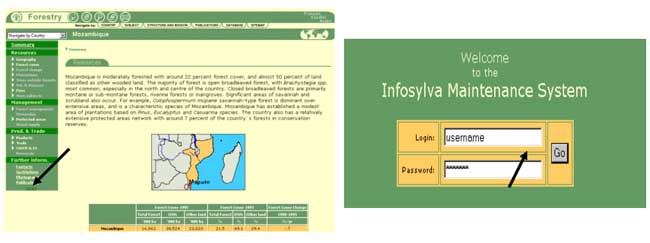
At the end of menu (green thing on the left side) there is a link which can be clicked. 
By clicking this link users can get log in entry. After filling username and password fields Go button has to be clicked. After this the user is in the system and at the top of web page there appears user information. User information includes last name, first name and current time. This information includes name of user and also user rights (these can be looked by clicking users name).
The full address for the site is (http://www.fao.org/forestry/fo/country/nav_world.jsp ).
Figure 7. Logging in.
Logging out from system is even more easily done than logging in. There is small world map on the right top of the page. And above of this map is small symbol that works as log out procedure when clicked. See following picture.
Figure 8. Logging out.

